Set up Playwright Check Suites with AI
Getting started with Playwright Check Suites just got a lot easier.
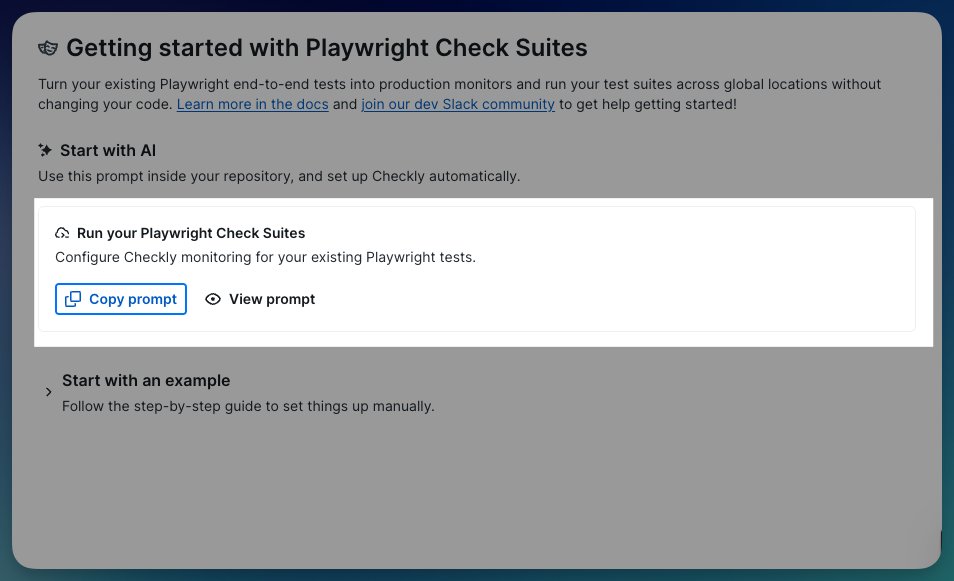
We added a Copy prompt button to the Playwright Check Suites onboarding. Yes, the whole config setup is now a copy-paste.
Curious about these checks but weren’t sure how to get started? You can use Playwright Check Suites to test against multiple browsers, reuse storage, and bring your own dependencies to your monitoring. Truly reusing Playwright tests as monitoring checks to ensure your customers get the best experience possible.
Here's how it works:
Click Copy prompt in the Checkly UI
Paste it into your AI coding tool in the context of your repo. Claude Code, Cursor, Copilot… (your call)
The prompt reads your repo's Playwright setup (projects, test files, base URLs, dependencies), and generates check suite definitions grouped by project and tags
It iterates and tests until the config looks right, then deploys once you’re ready
You get a working checkly.config.ts without writing one from scratch. No digging through docs. No config guessing. Repo to running checks, directly.
Also available for Test Sessions and Playwright Reporter setup. Same flow, same copy-paste, and a different prompt for each.
This is just the beginning; we're already planning what's next. Got feedback? We want it. Reach out in our Slack community or tell us here directly.