Changelog

Follow new updates and improvements to Checkly.

Rocky AI RCA now pulls in OTeL traces and the last passing result
We just added two new sources of data Rocky AI can pull from to create a root cause analysis for your failing checks, monitors and test results.

Open Telemetry Traces

If you are using Checkly Traces, Rocky AI now automatically finds, queries and evaluates relevant traces linked to your failures. The example below is from Checkly’s own backend infrastructure.
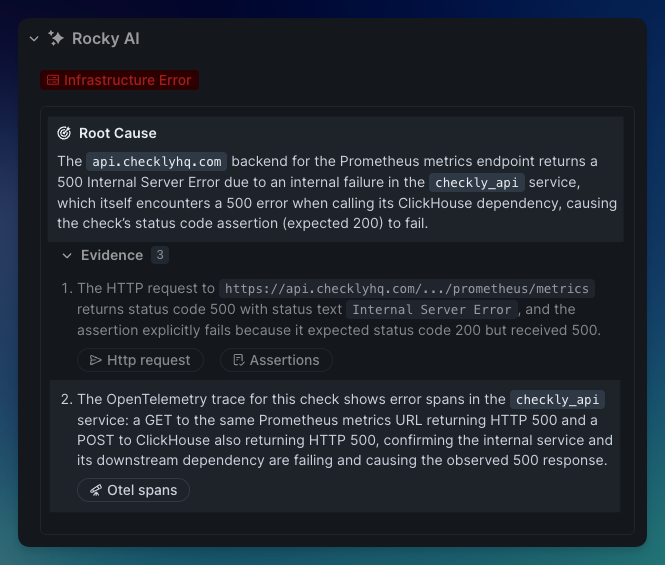
Open Telemetry spans indicate backend error
  • Our API check that checks if our customer facing Prometheus endpoint works, failed with a 500 error.

  • The OTeL trace indicates this was actually do to our Clickhouse server returning a 500 errors, immediately telling our on-call team where to start looking.

  • Without the trace, we would have to look at all the various logging, error tracking and other tools that are integrated into the various middleware and infrastructure this request passes through (our load balancer, REST API server, Redis datastore etc.)

This feature is now live for all Checkly Traces users. Checkly Traces and Rocky AI Root Cause Analyses are part of the Checkly Resolve package. 10 Rocky AI root cause analyses are part of the free Checkly Hobby plan.

Last passing result

Rocky AI now automatically searches for and interprets a last passing result for your failing check, monitor or check result. This is useful to more clearly indicate what the nature of a regression is: specifically for more “verbose” checks like Playwright, Browser and Multistep checks.

It can indicate for instance that a network error is transient, not persistent, as it can see that an earlier call — 2 minutes earlier in the example below — passed without failure.
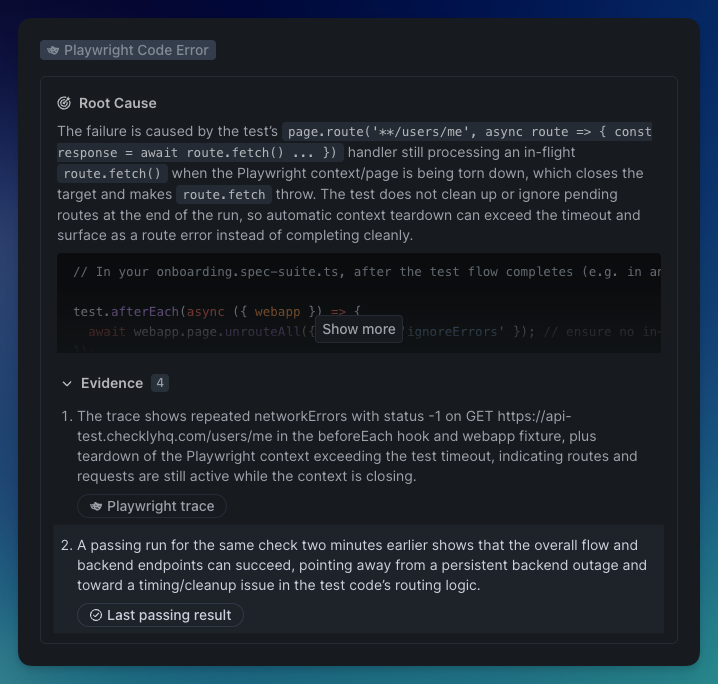
Two caveats:

  1. A last passing result for monitors and checks might not always exist: the check might start failing immediately after creation.

  2. A last passing result for test session might not exist because it is the first run, or when the test name was changed, the individual spec was removed from a test suite etc.

This feature is now live for all Rocky AI Root Cause Analyses users.


Happy monitoring!

Questions or feedback? Join our Slack community.
Improved

Agent-friendly Checkly CLI

The Checkly CLI now speaks agent because we shipped a skills-based self-discovery system, new read and write commands for your full monitoring setup, and analytics stats to let AI agents navigate all of Checkly's capabilities. Your coding agent will now understand the state of your monitoring, and take action. All from the terminal.

🧭 Discover: Let Your Agent Find Its Way

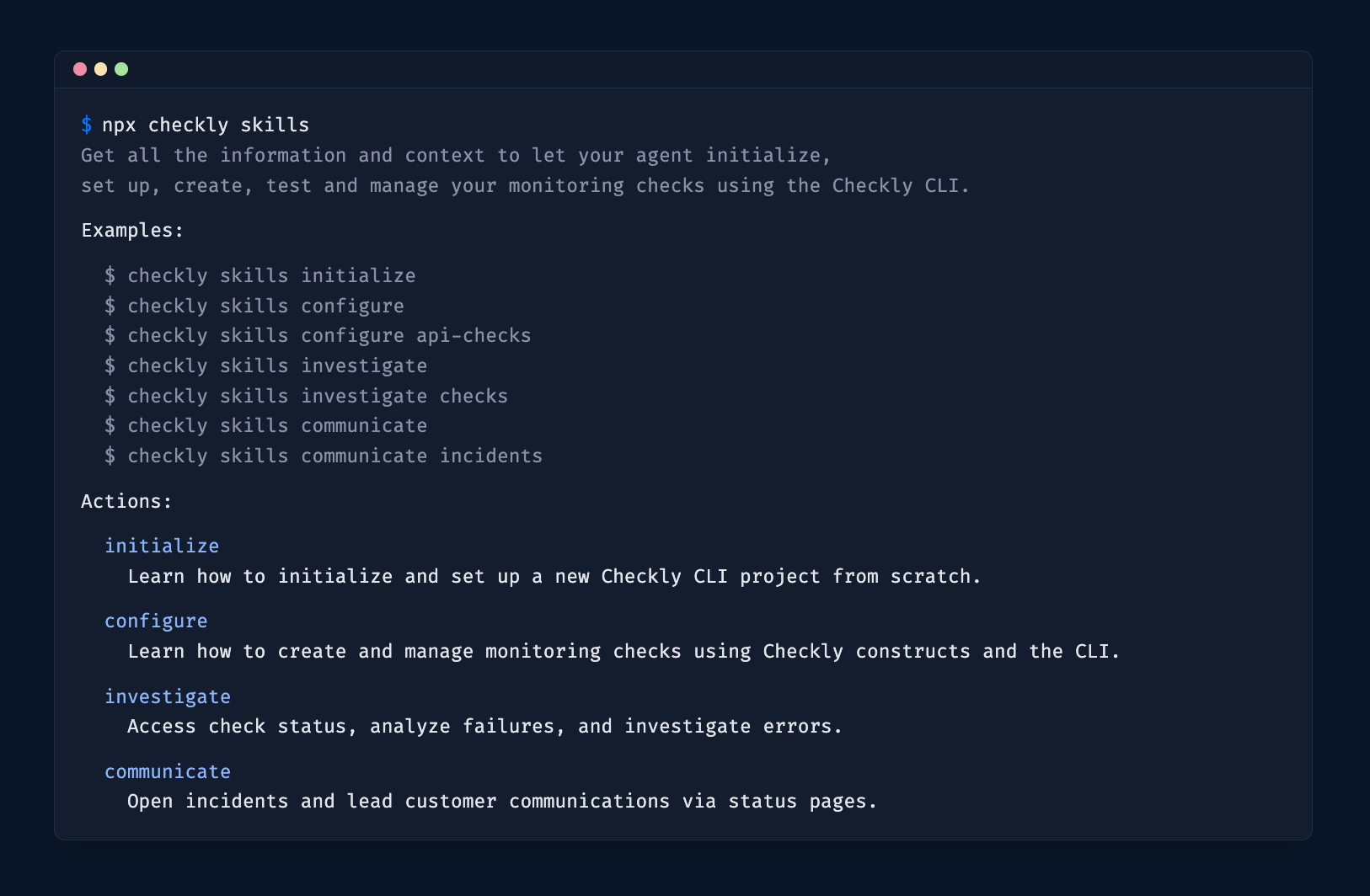
Terminal showing the output of the `npx checkly skills` command

The npx checkly skills command gives agents a structured way to explore everything the CLI can do. It uses progressive disclosure across three levels:

  1. Overview — run npx checkly skills to list all available actions: initialize, configure, investigate, communicate and manage .

  2. Action — run npx checkly skills investigate to get the detailed guide for that action category.

  3. Reference — run npx checkly skills configure api-checks to get construct-level documentation for a specific topic.

This is the entry point for any agent integration. Point your agent at npx checkly skills and it figures out the rest. No docs browsing needed.

👉 Install the Checkly skill using npx checkly skills install to get going! (available since v7.7.0, replaces the previous npx skills add command)

🔓 Let your agent know about your plan

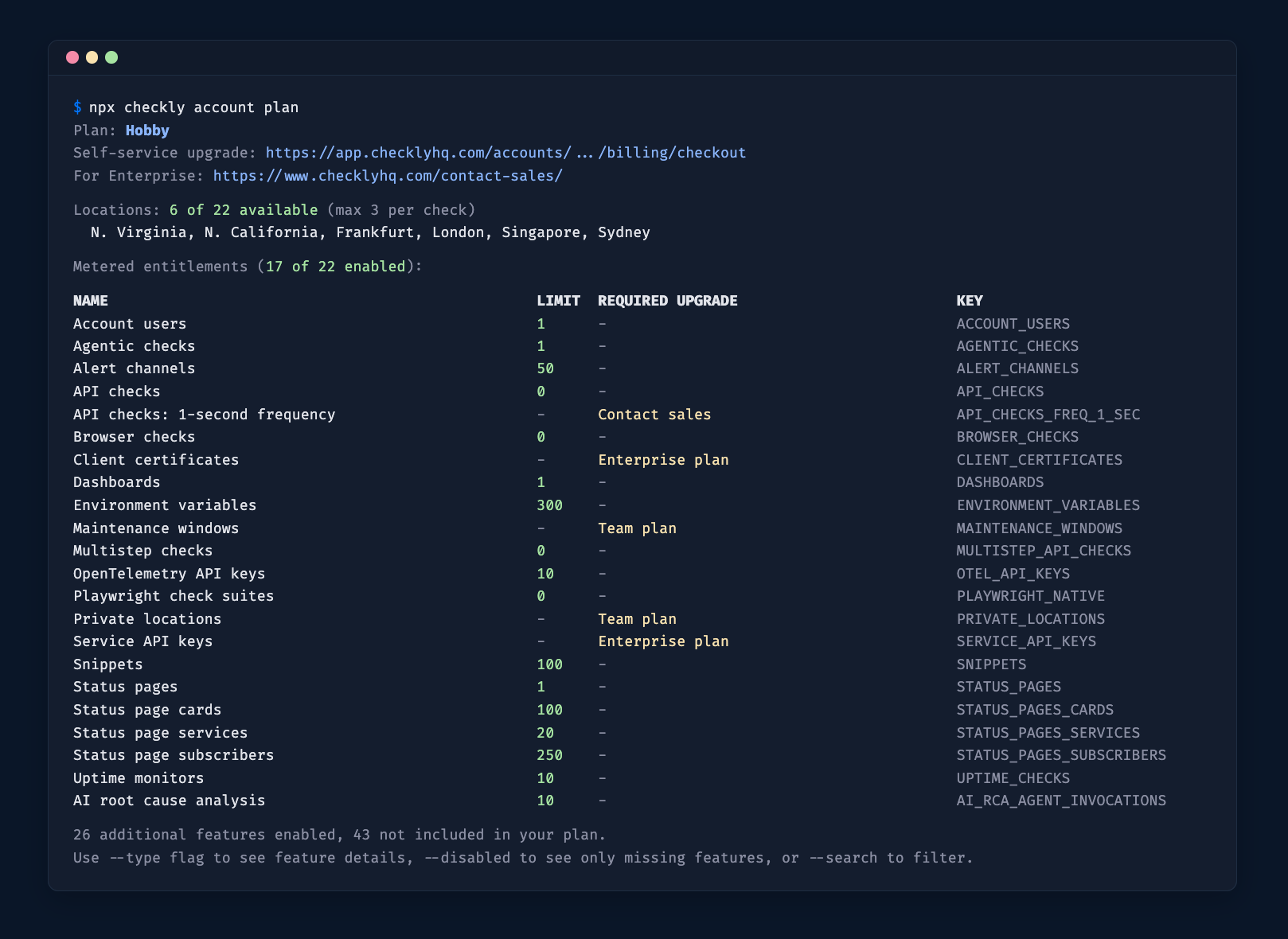
Terminal showing the output of the `npx checkly account plan` command

npx checkly account plan — shows your current plan, the features you have access to, and the upgrade path. This helps agents know which commands and capabilities are available for your account, and when to prompt you to upgrade.

🔍 Investigate: Query and Analyze Your Checks

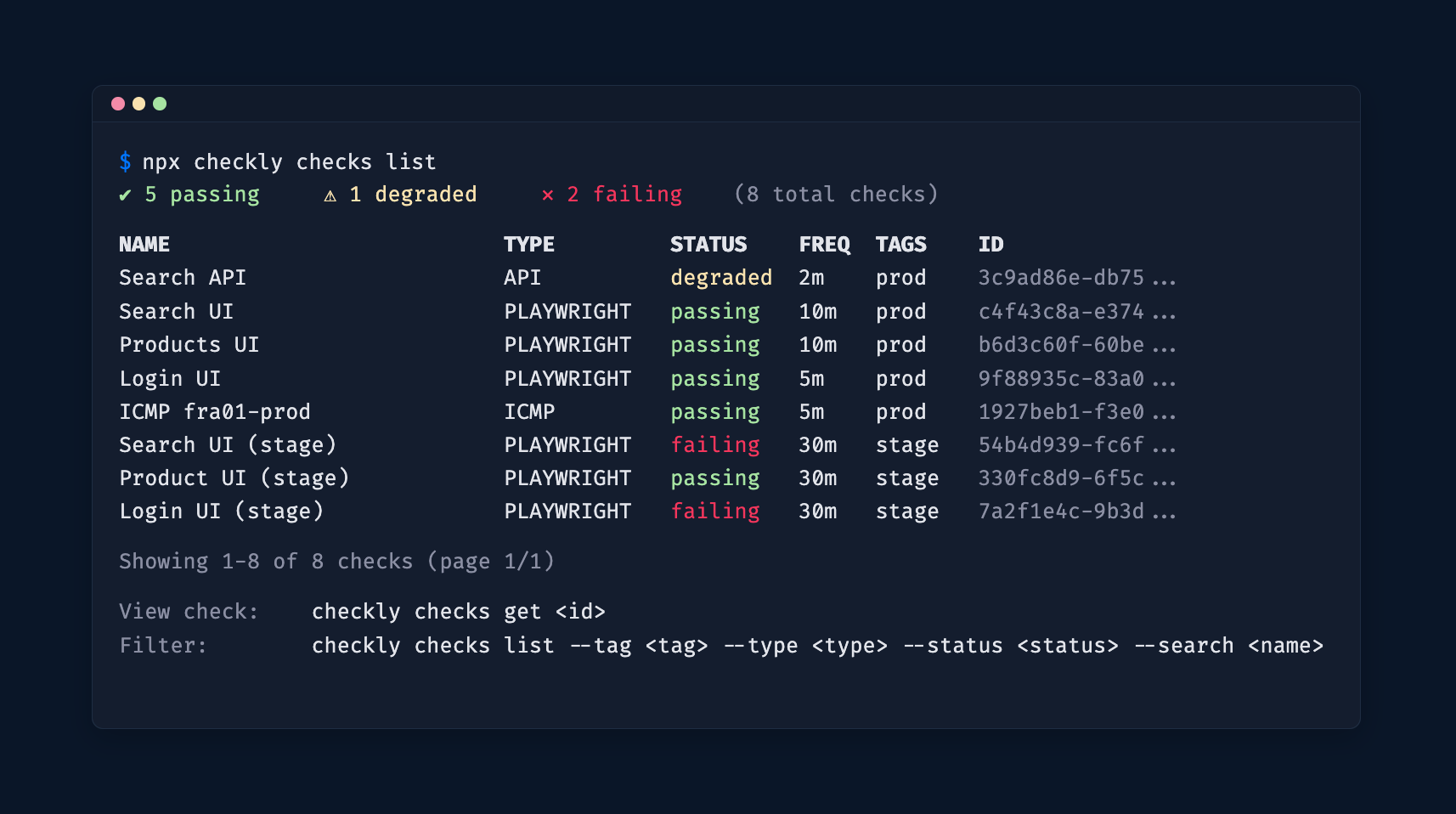
Terminal showing the output of the `npx checkly checks list` command

A set of read-only commands lets agents (and humans) inspect and analyze your Checkly account directly from the CLI.

List and filter checks

npx checkly checks list — list all checks with their current status. Filter by name (--search), tag (--tag), or check type (--type).

Docs

Drill into a specific check

npx checkly checks get <checkId> — see configuration, recent results, error groups, and analytics stats for a single check. Customize the stats view with --stats-range, --group-by, --metrics, and --filter-status.

# Check details with 7-day stats grouped by location
npx checkly checks get 12345 --stats-range=last7Days --group-by=location 

# Only failure stats with specific metrics 
npx checkly checks get 12345 --filter-status=failure --metrics=availability,responseTime_p95 

Docs

Analytics stats across checks (available since v7.6.0)

npx checkly checks stats — view availability, response times, and other key metrics across multiple checks at once. Filter by tag, type, or name, and set a time range.

# Stats for all production API checks over the last 7 days
npx checkly checks stats --range=last7Days --tag=production --type=API 

# Stats for specific checks 
npx checkly checks stats 12345 67890 

Default metrics adapt to the check type: response time percentiles for API/URL, Web Vitals for Browser/Playwright, latency and packet loss for ICMP, and so on.

All read commands support --output table|json|md for flexible consumption by agents or CI pipelines.

Docs

🚨 Communicate: Incident Management

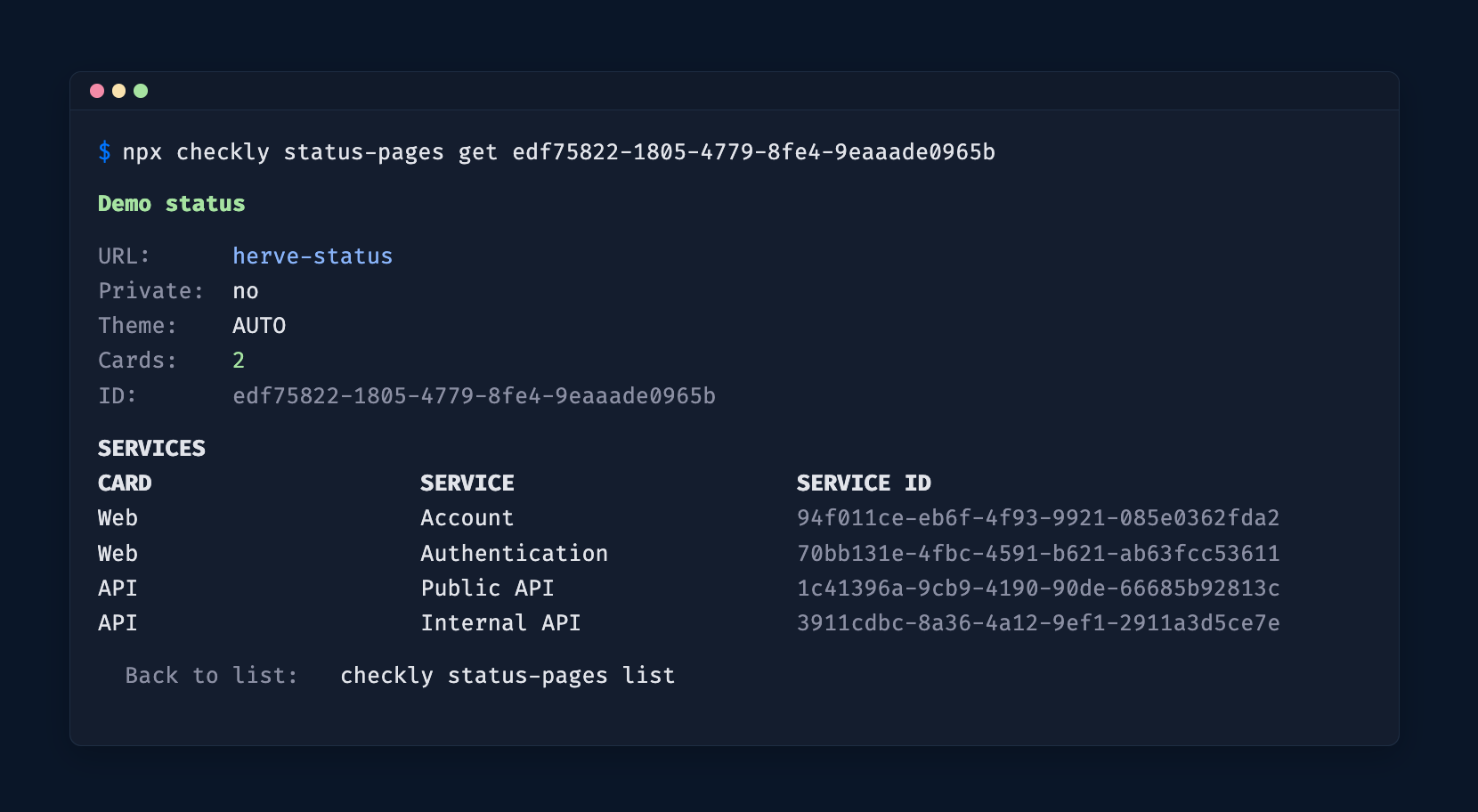
Terminal showing the output of the `npx checkly status-pages get` command

The CLI covers the full incident lifecycle on your status pages.

Status Pages

  • npx checkly status-pages list — list all your status pages and their services.

  • npx checkly status-pages get <id> — get the full state of a specific status page.

Docs

Incidents

  • npx checkly incidents list — list active or past incidents.

  • npx checkly incidents create — open a new incident on a status page.

  • npx checkly incidents update <id> — post a progress update.

  • npx checkly incidents resolve <id> — close an incident.

Docs

🛡️ Agent Safety

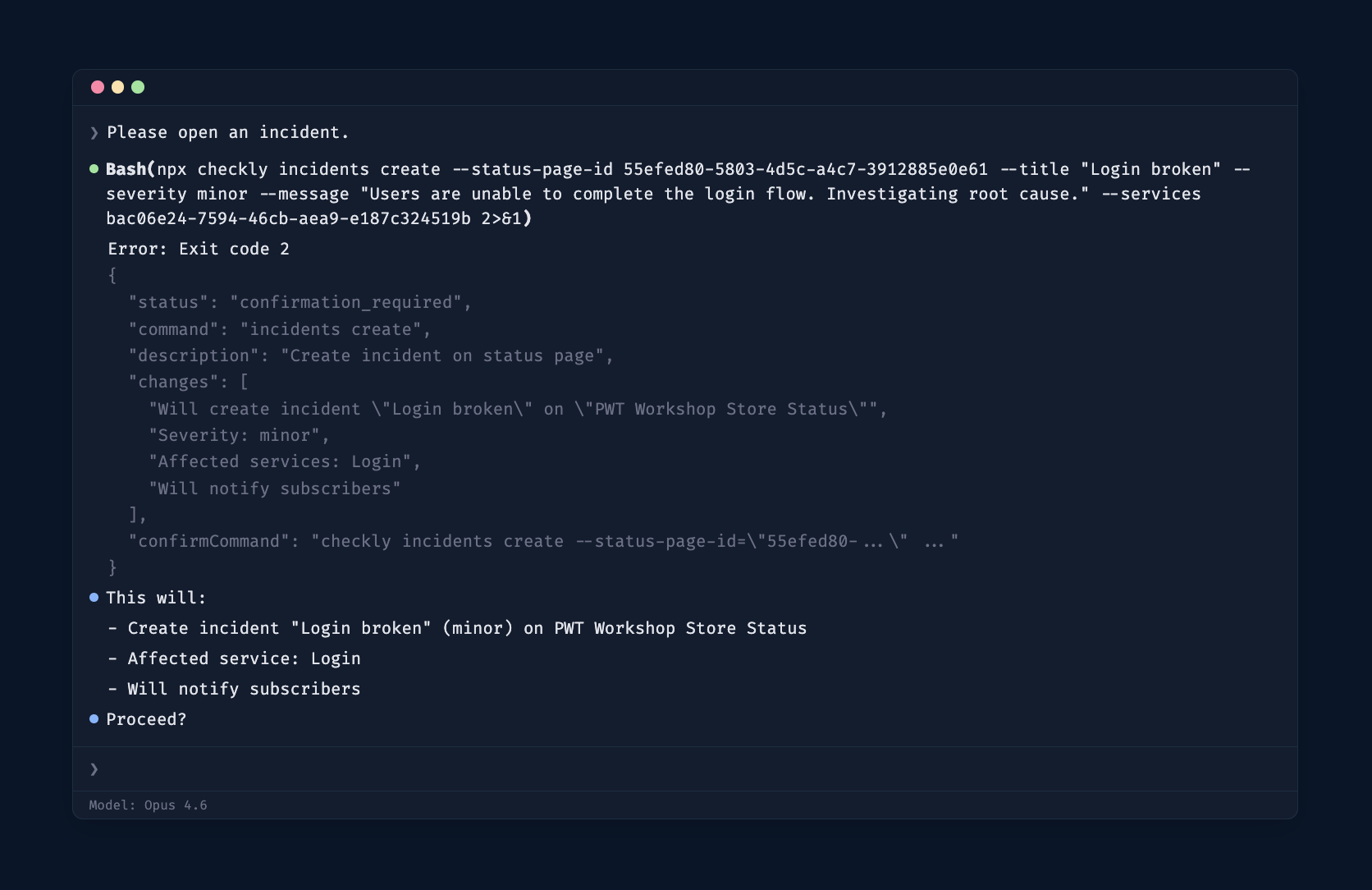
Terminal showing the output of a CLI command in agent mode, required to ask user for confirmation

Write commands (create, update, resolve, deploy) implement a confirmation protocol designed for agent safety. When an agent runs a write command, the CLI returns exit code 2 with a JSON envelope:

{
  "status": "confirmation_required",
  "command": "incidents create",
  "changes": [
    "Will create incident \"DB outage\" on status page \"Acme\"",
    "Severity: major"
  ],
  "confirmCommand": "checkly incidents create --title=\"DB outage\" ... --force"
}

The agent presents the changes to the user, waits for approval, then runs the provided confirmCommand. Use --dry-run to preview changes without triggering confirmation.

Get Started

Upgrade to the latest version:

npm install checkly@latest 

Install the Checkly skill:

npx checkly skills install 

Full CLI docs · GitHub releases · Questions or feedback? Join our Slack community.
Set up Playwright Check Suites with AI

Getting started with Playwright Check Suites just got a lot easier.

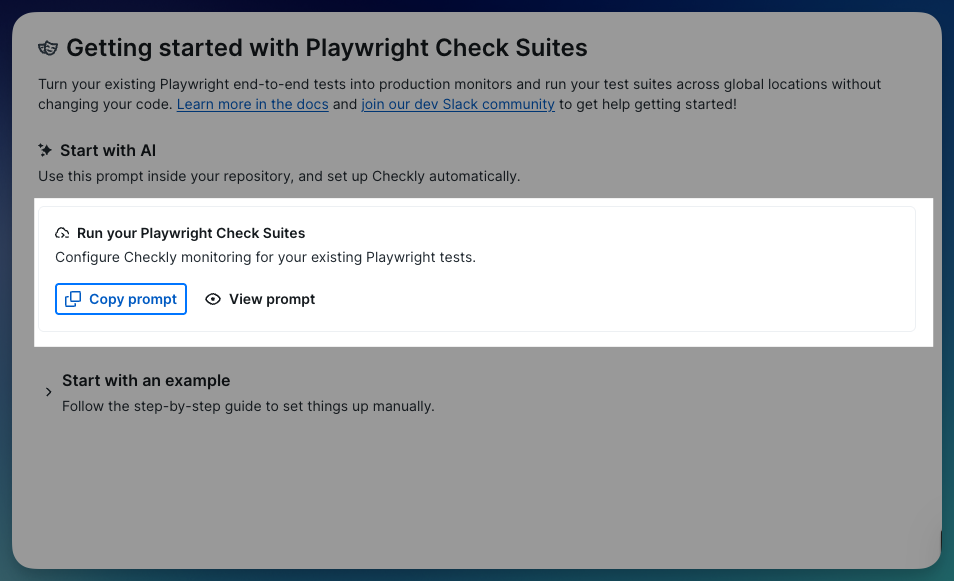
We added a Copy prompt button to the Playwright Check Suites onboarding. Yes, the whole config setup is now a copy-paste.

Curious about these checks but weren’t sure how to get started? You can use Playwright Check Suites to test against multiple browsers, reuse storage, and bring your own dependencies to your monitoring. Truly reusing Playwright tests as monitoring checks to ensure your customers get the best experience possible.

Here's how it works:

  1. Click Copy prompt in the Checkly UI

  2. Paste it into your AI coding tool in the context of your repo. Claude Code, Cursor, Copilot… (your call)

  3. The prompt reads your repo's Playwright setup (projects, test files, base URLs, dependencies), and generates check suite definitions grouped by project and tags

  4. It iterates and tests until the config looks right, then deploys once you’re ready

You get a working checkly.config.ts without writing one from scratch. No digging through docs. No config guessing. Repo to running checks, directly.

Also available for Test Sessions and Playwright Reporter setup. Same flow, same copy-paste, and a different prompt for each.

This is just the beginning; we're already planning what's next. Got feedback? We want it. Reach out in our Slack community or tell us here directly.

Improved

Earlier updates