Changelog

Follow new updates and improvements to Checkly.

Checkly CLI 8: ESM-only, cancellable Playwright check runs, and recording by default
Checkly CLI 8 is here with three big behavior changes: the CLI is now ESM-only, CTRL+C now cancels running checks, and test, pw-test and trigger now record results by default.

It also adds support for multiple Node.js/Bun versions, simplifies TypeScript support, updates how Playwright include patterns resolve, and automatically loads .env files when present.


v8.0.0 ESM-only and updated Node.js requirements

The Checkly CLI is now distributed as ESM only instead of CommonJS.

CLI 8 requires Node.js versions matching ^20.19.0 || >=22.12.0

In plain English, you’ll need to use

  • Node.js 20.19.0 or later on the Node 20 release line

  • Node.js 22.12.0 or later

Earlier Node.js 20 and 22 versions are not supported. Before upgrading, make sure your local development, CI, and deployment environments use a compatible Node.js version.

Your own projects can of course still use CommonJS.


v8.1.0 Playwright Check Suites now support multiple Node/Bun versions

When using Playwright Check Suites, the CLI now looks at your project’s version files (.nvmrc, .node-version, .bun-version, etc.) and selects a compatible Node or Bun version for you. We currently support the following versions:

  • Node.js: 22 (default), 24, 26

  • Bun: 1.3 (default)

If you use a different version, we’ll choose the most compatible version for you.

You can also override automatic detection by setting the new engine property:


import { Engine, PlaywrightCheck } from 'checkly/constructs'

new PlaywrightCheck('my-playwright-check', {
  /* ... */
  engine: Engine.node('24'),
})

v8.0.0 No need to install a TypeScript loader separately anymore!

Starting with CLI 8, Checkly uses jiti exclusively. It supports modern TypeScript features out of the box, does not require a tsconfig, and now supports tsconfig paths automatically.

jiti is now bundled as a direct dependency when you install Checkly:

npm install checkly@latest 

So you no longer need to install or manage it separately. That means no extra loader setup and one fewer dependency to manage.

For type checking, please rely on your editor of choice, and make sure that your type checking workflows cover your Checkly files. jiti does not produce type errors.

ts-node is no longer supported.


v8.0.0 Test sessions are now recorded by default

The test and trigger commands now record results by default.

That means your runs will be recorded unless you explicitly opt out. To disable recording, use the --no-record option:

npx checkly test --no-record
npx checkly trigger --no-record

If your scripts relied on recording being off by default, update them before upgrading.


v8.0.0 CTRL+C now cancels running Playwright Check Suites

Ever started checkly test or checkly trigger and realized three seconds later it was absolutely not going to pass?

No need to watch it fail in slow motion.

Pressing CTRL+C during test , pw-test or trigger now cancels in-flight test sessions instead of leaving them running in the background eating into your quota.

npx checkly test 
# CTRL+C 
# Cancelling Playwright checks... ⊘ Docs Environment (0ms)

Need the previous “keep running in the cloud after I disconnect” behaviour? Run in detached mode with --detach or -d

npx checkly test --detach 
# CTRL+C 
# Checks will continue running in the cloud. 

v8.0.0 .env files are now loaded automatically

The CLI now automatically loads a .env file when one is present.

You can use it for configuration such as:

  • API keys

  • Account IDs

  • Environment-specific variables

To disable automatic .env loading entirely, set:

CHECKLY_NO_DOTENV=1 

ℹ️ These environment variables are only available locally to the CLI - they do not become Checkly environment variables.


v8.0.0 Playwright include patterns now resolve from the config directory

Playwright check Suites include patterns now resolve relative to the directory of your Playwright config file, not the project root.

This now matches Playwright’s own behavior, which should make path resolution more predictable.

If your Playwright config lives in a subdirectory, double-check your include globs after upgrading.


Extra!

checkly rca run now support --test-session-error-group or -te to trigger a Root Cause Analysis on Test Session Error Groups.


Happy monitoring (and testing!)

Questions or feedback? Join our Slack community.
NewCheckly CLI

Agent-friendly Checkly CLI

The Checkly CLI now speaks agent because we shipped a skills-based self-discovery system, new read and write commands for your full monitoring setup, and analytics stats to let AI agents navigate all of Checkly's capabilities. Your coding agent will now understand the state of your monitoring, and take action. All from the terminal.

🧭 Discover: Let Your Agent Find Its Way

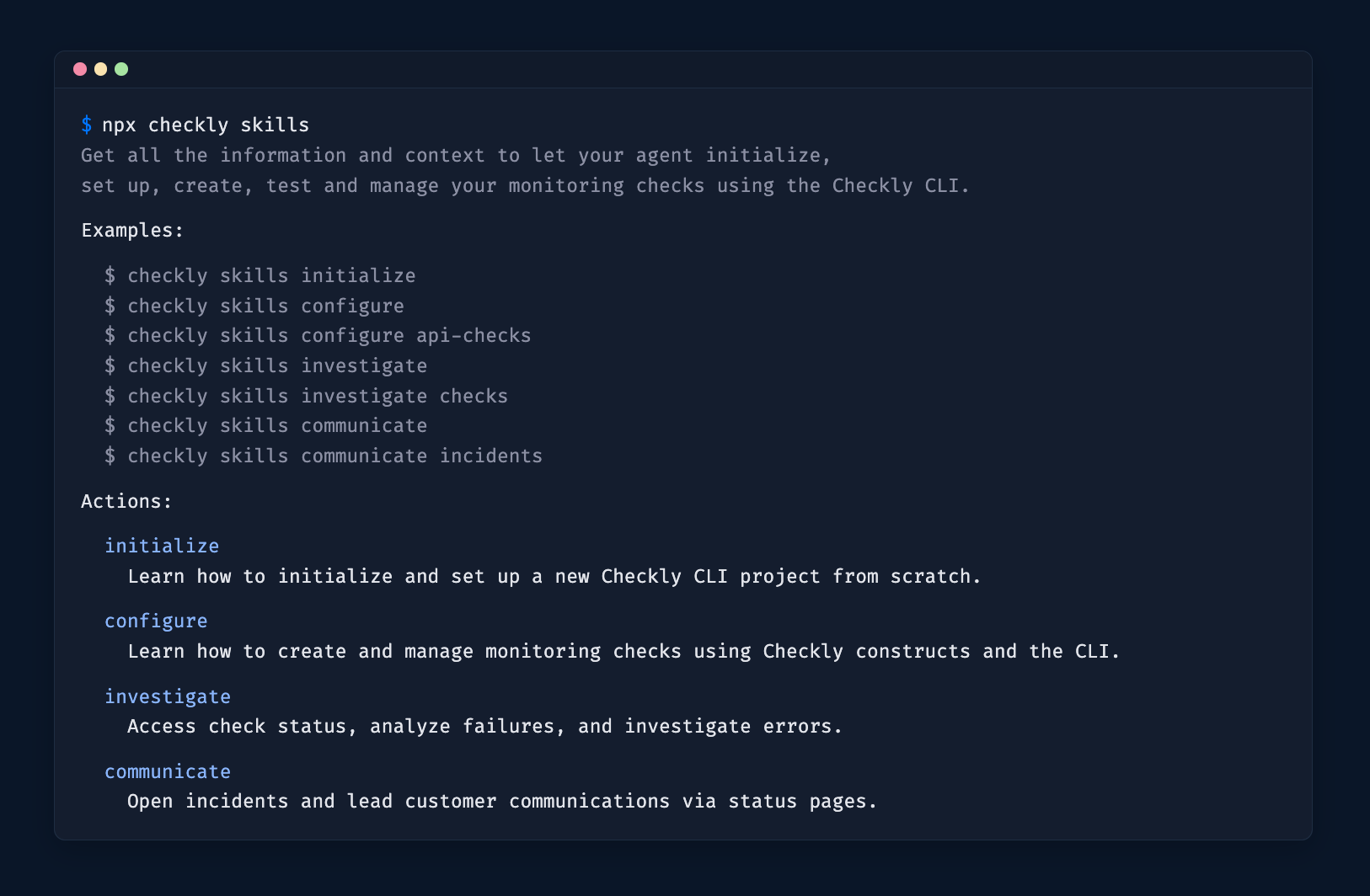
Terminal showing the output of the `npx checkly skills` command

The npx checkly skills command gives agents a structured way to explore everything the CLI can do. It uses progressive disclosure across three levels:

  1. Overview — run npx checkly skills to list all available actions: initialize, configure, investigate, communicate and manage .

  2. Action — run npx checkly skills investigate to get the detailed guide for that action category.

  3. Reference — run npx checkly skills configure api-checks to get construct-level documentation for a specific topic.

This is the entry point for any agent integration. Point your agent at npx checkly skills and it figures out the rest. No docs browsing needed.

👉 Install the Checkly skill using npx checkly skills install to get going! (available since v7.7.0, replaces the previous npx skills add command)

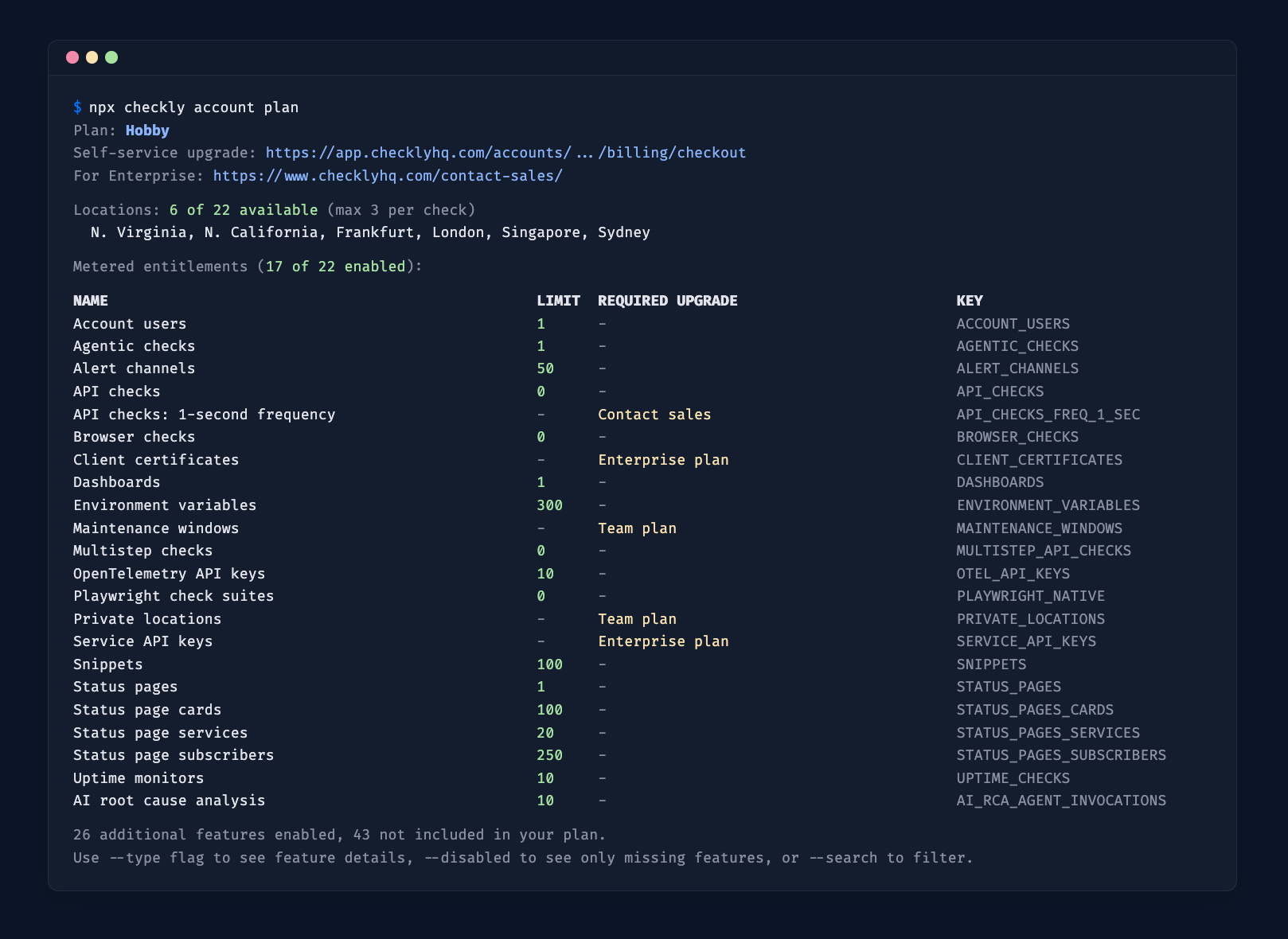
🔓 Let your agent know about your plan

Terminal showing the output of the `npx checkly account plan` command

npx checkly account plan — shows your current plan, the features you have access to, and the upgrade path. This helps agents know which commands and capabilities are available for your account, and when to prompt you to upgrade.

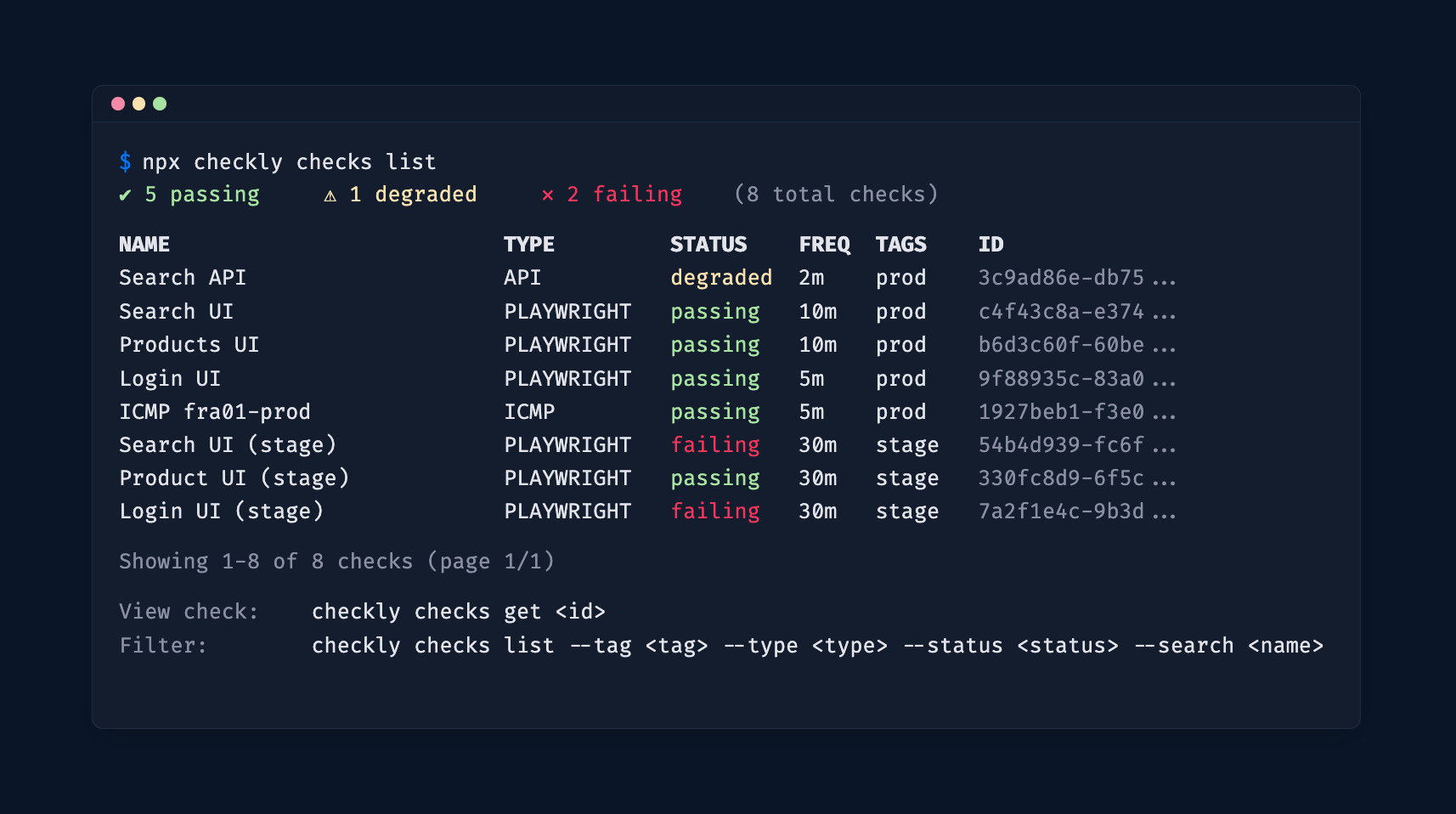
🔍 Investigate: Query and Analyze Your Checks

Terminal showing the output of the `npx checkly checks list` command

A set of read-only commands lets agents (and humans) inspect and analyze your Checkly account directly from the CLI.

List and filter checks

npx checkly checks list — list all checks with their current status. Filter by name (--search), tag (--tag), or check type (--type).

Docs

Drill into a specific check

npx checkly checks get <checkId> — see configuration, recent results, error groups, and analytics stats for a single check. Customize the stats view with --stats-range, --group-by, --metrics, and --filter-status.

# Check details with 7-day stats grouped by location
npx checkly checks get 12345 --stats-range=last7Days --group-by=location 

# Only failure stats with specific metrics 
npx checkly checks get 12345 --filter-status=failure --metrics=availability,responseTime_p95 

Docs

Analytics stats across checks (available since v7.6.0)

npx checkly checks stats — view availability, response times, and other key metrics across multiple checks at once. Filter by tag, type, or name, and set a time range.

# Stats for all production API checks over the last 7 days
npx checkly checks stats --range=last7Days --tag=production --type=API 

# Stats for specific checks 
npx checkly checks stats 12345 67890 

Default metrics adapt to the check type: response time percentiles for API/URL, Web Vitals for Browser/Playwright, latency and packet loss for ICMP, and so on.

All read commands support --output table|json|md for flexible consumption by agents or CI pipelines.

Docs

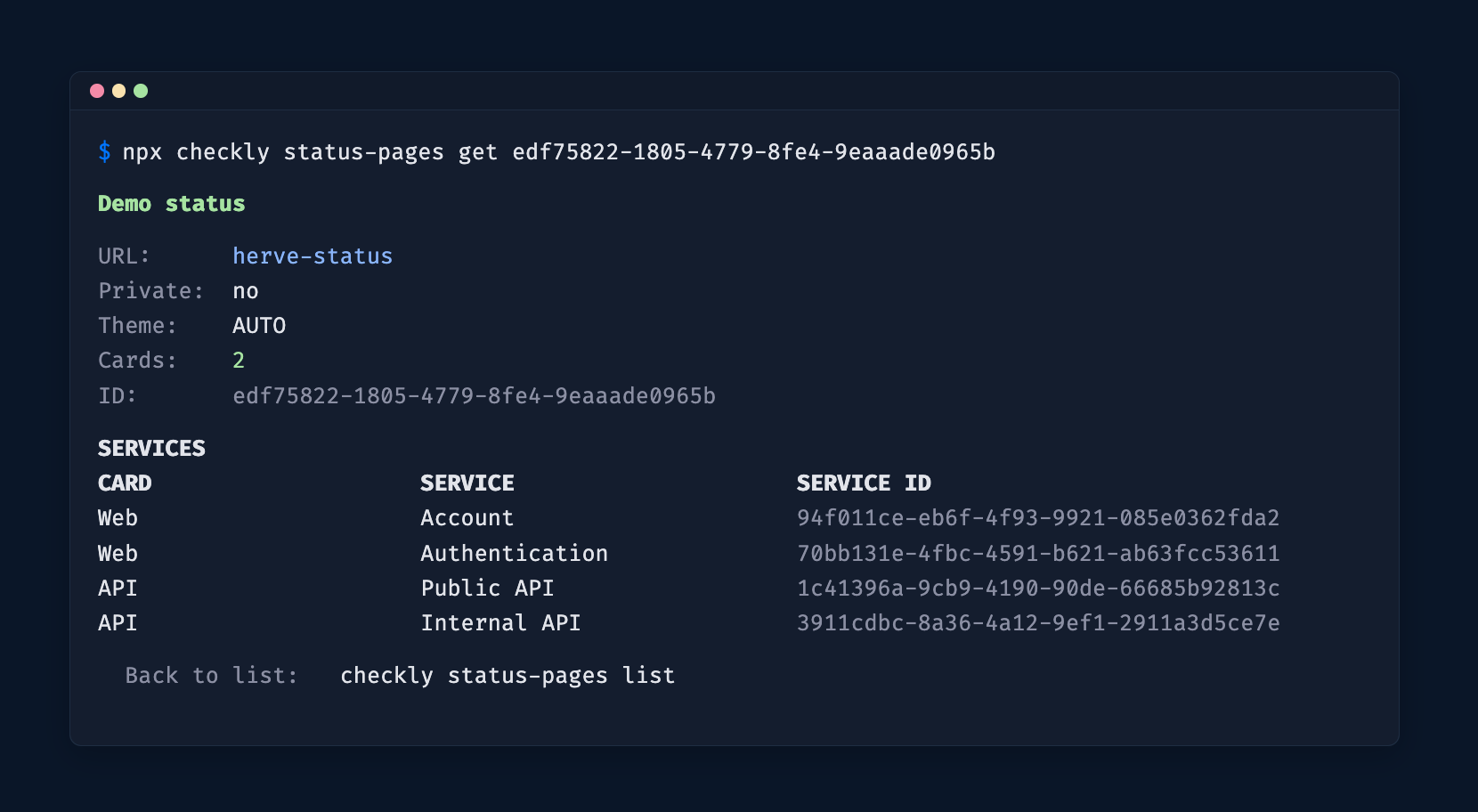
🚨 Communicate: Incident Management

Terminal showing the output of the `npx checkly status-pages get` command

The CLI covers the full incident lifecycle on your status pages.

Status Pages

  • npx checkly status-pages list — list all your status pages and their services.

  • npx checkly status-pages get <id> — get the full state of a specific status page.

Docs

Incidents

  • npx checkly incidents list — list active or past incidents.

  • npx checkly incidents create — open a new incident on a status page.

  • npx checkly incidents update <id> — post a progress update.

  • npx checkly incidents resolve <id> — close an incident.

Docs

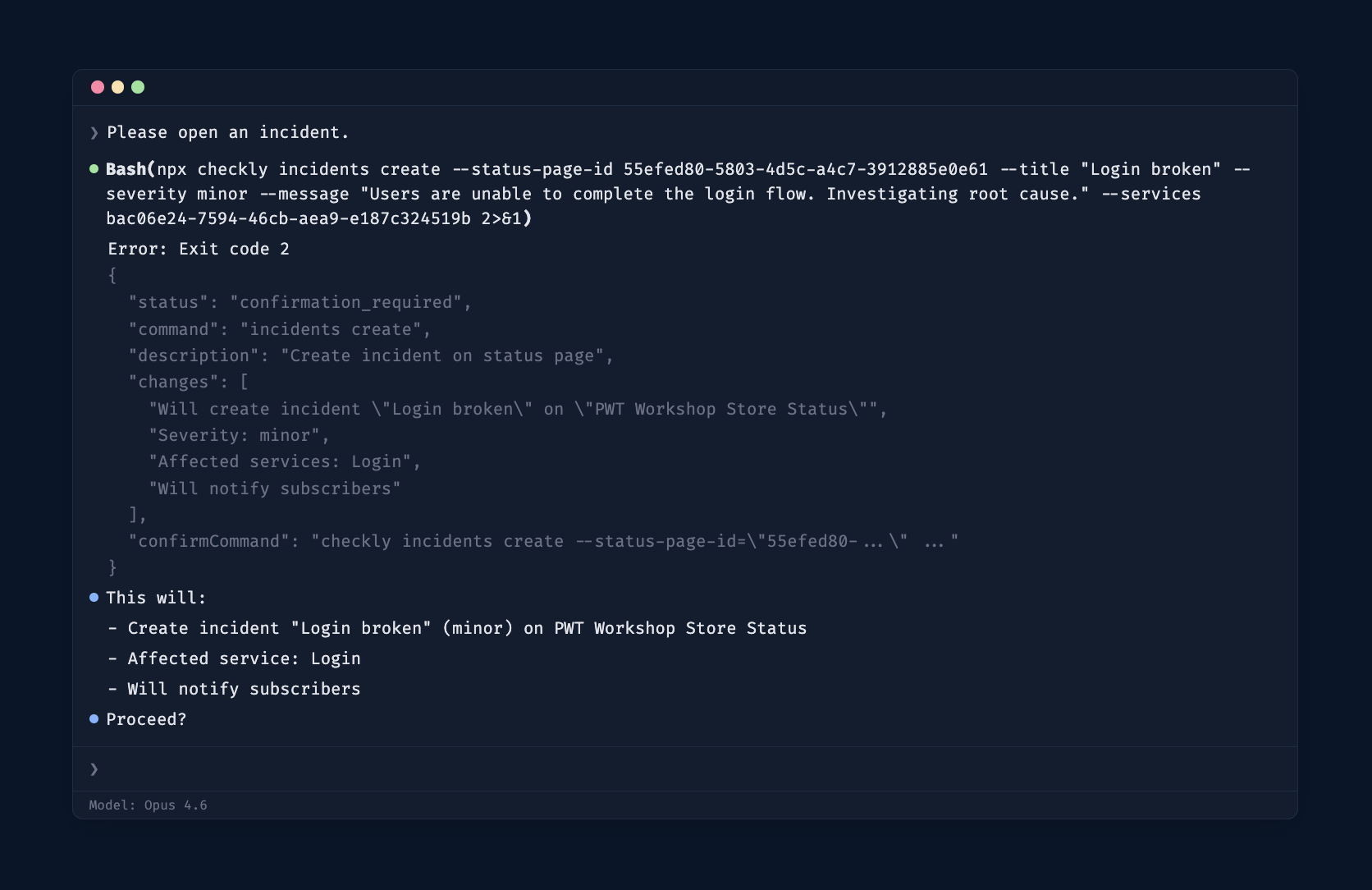
🛡️ Agent Safety

Terminal showing the output of a CLI command in agent mode, required to ask user for confirmation

Write commands (create, update, resolve, deploy) implement a confirmation protocol designed for agent safety. When an agent runs a write command, the CLI returns exit code 2 with a JSON envelope:

{
  "status": "confirmation_required",
  "command": "incidents create",
  "changes": [
    "Will create incident \"DB outage\" on status page \"Acme\"",
    "Severity: major"
  ],
  "confirmCommand": "checkly incidents create --title=\"DB outage\" ... --force"
}

The agent presents the changes to the user, waits for approval, then runs the provided confirmCommand. Use --dry-run to preview changes without triggering confirmation.

Get Started

Upgrade to the latest version:

npm install checkly@latest 

Install the Checkly skill:

npx checkly skills install 

Full CLI docs · GitHub releases · Questions or feedback? Join our Slack community.
🚀 Checkly CLI v6.0.0 – CheckGroupsV2, Smarter construct handling & more!

We’ve just released a new major version of the CLI (v6.0.0) with a number of exciting improvements. Here’s what’s new:

Farewell ‘CheckGroup’: Meet ‘CheckGroupV2’

We’ve introduced a new construct called CheckGroupV2 (replacing the now-deprecated CheckGroup) that makes working with groups more flexible and intuitive.

In Checkly, groups help you organize checks together and apply shared configuration — like where checks run, how often they run, or how alerts are sent. Previously, certain group level settings (runParallel, locations, alertEscalationPolicy, and retryStrategy) were always enforced. Every check in a group automatically inherited the group’s values for these settings, with no way to opt out.

With CheckGroupV2, these settings are now optional. Groups can now act more like folders, with zero config shared.

👉 Read the change log on groups to learn more.

Smarter construct handling

We’ve improved how the CLI processes Constructs behind the scenes. This comes with better error reporting (see multiple issues at once), faster CLI performance and more meaningful filtering (only bundles the checks you need).

⚠️ This change is backward-compatible, but there are a few edge cases to watch out for:

  • If you’ve created custom Constructs (e.g. by extending ours), you may need to update your implementation.

  • If your code accesses low-level or internal fields directly from constructs, those fields might now be moved to the bundled output.

  • If your code depends on construct errors being thrown right away (e.g. during new ApiCheck()), that’s changed — errors now show up later during processing.

Most users won’t be impacted, but custom tooling or advanced integrations may need updating. If you have any questions or would like to learn more, don’t hesitate to reach out to support.

File Deduplication for Scalable Projects

The CLI now deduplicates shared files across checks. If multiple checks reference the same files, those files will only be uploaded once, reducing overall upload size. This change makes deployments more efficient and also allows far more checks to be deployed within the same project.

Ready to get started with CLI v6.0.0?

Update to the latest version with: npm install checkly@latest.

Check out the CLI documentation or swing by the CLI repository for more details.

Questions or feedback? Join our Slack community or reach out to support. We’re here to help!

Checkly CLI

Earlier updates